- Weaviate on local Kubernetes
Weaviate on local Kubernetes
I already set up a local dev Kubernetes Cluster and set up [Terraform ] now want to use Terraform to deploy a Weaviate Vector Database to it. The database is deployed by Docker with the following command:
docker run -p 8080:8080 -p 50051:50051 cr.weaviate.io/semitechnologies/weaviate:11.39.7
This gives us the Image we need and the two ports that we will have to expose from our deployment. Now there is also a docker-compose example in the official documentation:
services:
    weaviate:
        image: cr.weaviate.io/semitechnologies/weaviate:1.32.1
        ports:
            - "8080:8080"
            - "50051:50051"
        volumes:
            - data:/var/lib/weaviate
        environment:
            QUERY_DEFAULTS_LIMIT: 25
            AUTHENTICATION_ANONYMOUS_ACCESS_ENABLED: 'true'
            PERSISTENCE_DATA_PATH: '/var/lib/weaviate'
        restart: on-failure

volumes:
    weaviate_data:
That means that I will also have to mount a volume into the pod at /var/lib/weaviate to persist my DB data.
Terraform deployment
This folder contains a self-contained Terraform module that deploys Weaviate (an open-source vector database) into the local single-node Kubernetes cluster (node omarchy, v1.36.2, containerd 2.3.5) and makes it reachable at:
- REST:
http://localhost:8080 - gRPC:
localhost:50051 - In-cluster:
weaviate.weaviate.svc.cluster.local
All DB data is persisted in ./data (mounted at /var/lib/weaviate inside the container), equivalent to the weaviate_data volume in the Docker docs.
Network note (China network):
cr.weaviate.io,registry-1.docker.ioand parts ofregistry.terraform.ioare not reachable from this machine. The Terraform provider downloads fine, but the Weaviate docker image must be imported from a tar file (downloaded via VPN).
What this deploys
| Resource | HCL name |
|---|---|
| Namespace | kubernetes_namespace_v1.weaviate |
| Deployment (1 rep.) | kubernetes_deployment_v1.weaviate |
| Service (ClusterIP) | kubernetes_service_v1.weaviate |
Prerequisites
$ terraform -version
Terraform v1.15.9
on linux_amd64

$ kubectl get nodes
NAME      STATUS   ROLES           AGE   VERSION
omarchy   Ready    control-plane   23h   v1.36.2

$ ctr version           # containerd CLI, must be usable for image import
ctr: version: 2.3.5
$ ss -tln | grep -E ':(8080|50051)\s'   # both ports must be free

# `~/.kube/config` must work (`kubectl get pods -A` should list cluster pods)

$ kubectl get pods -A
NAMESPACE      NAME                              READY   STATUS    RESTARTS   AGE
kube-flannel   kube-flannel-ds-r5ng6             1/1     Running   0          39h
kube-system    coredns-7c456bc5d4-fmcd7          1/1     Running   0          24h
kube-system    coredns-7c456bc5d4-hxjhl          1/1     Running   0          24h
kube-system    etcd-omarchy                      1/1     Running   2          39h
kube-system    kube-apiserver-omarchy            1/1     Running   2          39h
kube-system    kube-controller-manager-omarchy   1/1     Running   1          39h
kube-system    kube-proxy-tgprg                  1/1     Running   0          39h
kube-system    kube-scheduler-omarchy            1/1     Running   6          39h
Step 1 — Create the workspace and Terraform files
We work in the weaviate/ subdirectory and a ./data/ folder for persistence:
$ mkdir -p weaviate && cd weaviate && mkdir -p data
[!NOTE]
main.tf,deployment.tf,service.tfin this folder already contain the final, tested configuration. If reproducing from scratch, create them with the contents shown below.Key configuration facts (all from the Weaviate Docker docs):
- image
cr.weaviate.io/semitechnologies/weaviate(tag: the one you import)- ports
8080(REST) and50051(gRPC) bound to the host viahostPort, solocalhost:8080works exactly likedocker run -p 8080:8080./datamounted at/var/lib/weaviate(the doc'sPERSISTENCE_DATA_PATH)- env:
QUERY_DEFAULTS_LIMIT=25,AUTHENTICATION_ANONYMOUS_ACCESS_ENABLED=true(true, notenabled, is what the Weaviate binary expects)- Since this is a single node k8s development cluster the node carries a
node-role.kubernetes.io/control-plane:NoScheduletaint, so the pod has a matching toleration to be installed on the control plane!
main.tf
terraform {
  required_providers {
    kubernetes = {
      source  = "hashicorp/kubernetes"
      version = "~> 3.0"
    }
  }
}

provider "kubernetes" {
  config_path    = "~/.kube/config"
  config_context = "kubernetes-admin@kubernetes"
}

resource "kubernetes_namespace_v1" "weaviate" {
  metadata {
    name = "weaviate"
  }
}
deployment.tf
resource "kubernetes_deployment_v1" "weaviate" {
  metadata {
    name      = "weaviate"
    namespace = kubernetes_namespace_v1.weaviate.metadata[0].name
    labels = {
      app                           = "weaviate"
      "app.kubernetes.io/name"      = "weaviate"
      "app.kubernetes.io/component" = "vector-database"
    }
  }

  spec {
    replicas = 1
    selector {
      match_labels = {
        app = "weaviate"
      }
    }

    strategy {
      # Single replica with hostPath + hostPort: recreate avoids port conflicts.
      type = "Recreate"
    }

    template {
      metadata {
        labels = {
          app = "weaviate"
        }
      }

      spec {
        # Single-node dev cluster: tolerate the control-plane NoSchedule taint.
        toleration {
          key      = "node-role.kubernetes.io/control-plane"
          operator = "Exists"
          effect   = "NoSchedule"
        }

        container {
          name              = "weaviate"
          image             = "cr.weaviate.io/semitechnologies/weaviate:1.39.7"
          image_pull_policy = "IfNotPresent"

          port {
            name           = "http"
            container_port = 8080
            host_port      = 8080
          }
          port {
            name           = "grpc"
            container_port = 50051
            host_port      = 50051
          }

          env {
            name  = "QUERY_DEFAULTS_LIMIT"
            value = "25"
          }

          env {
            name  = "AUTHENTICATION_ANONYMOUS_ACCESS_ENABLED"
            value = "true"
          }

          env {
            name  = "PERSISTENCE_DATA_PATH"
            value = "/var/lib/weaviate"
          }

          readiness_probe {
            http_get {
              path = "/v1"
              port = 8080
            }
            initial_delay_seconds = 10
            period_seconds        = 10
            timeout_seconds       = 5
          }

          liveness_probe {
            http_get {
              path = "/v1"
              port = 8080
            }
            initial_delay_seconds = 30
            period_seconds        = 20
            timeout_seconds       = 5
          }

          volume_mount {
            name       = "weaviate-data"
            mount_path = "/var/lib/weaviate"
          }

          resources {
            limits = {
              cpu    = "2000m"
              memory = "2Gi"
            }
            requests = {
              cpu    = "500m"
              memory = "512Mi"
            }
          }
        }

        volume {
          name = "weaviate-data"
          host_path {
            path = "/home/user/Projects/terraform/weaviate/data"
            type = "DirectoryOrCreate"
          }
        }

        dns_policy                       = "ClusterFirst"
        restart_policy                   = "Always"
        termination_grace_period_seconds = 30
      }
    }
  }
}
service.tf
resource "kubernetes_service_v1" "weaviate" {
  metadata {
    name      = "weaviate"
    namespace = kubernetes_namespace_v1.weaviate.metadata[0].name
    labels = {
      "app.kubernetes.io/name" = "weaviate"
    }
  }

  spec {
    selector = {
      app = "weaviate"
    }

    # In-cluster DNS name: weaviate.weaviate.svc.cluster.local
    # Localhost access is served by the hostPort bindings (8080 / 50051)
    port {
      name        = "http"
      port        = 8080
      target_port = 8080
    }
    port {
      name        = "grpc"
      port        = 50051
      target_port = 50051
    }

    type = "ClusterIP"
  }
}
Step 2 — terraform init
Downloads the hashicorp/kubernetes provider (binary fetched from releases.hashicorp.com:
$ cd weaviate
$ terraform init -input=false

Initializing the backend...

Initializing provider plugins...
- Finding hashicorp/kubernetes versions matching "~> 3.0"...
- Installing hashicorp/kubernetes v3.2.1...
- Installed hashicorp/kubernetes v3.2.1 (signed by HashiCorp)

Terraform has created a lock file .terraform.lock.hcl to record the provider
selections it made above. Include this file in your version control repository
so that Terraform can guarantee to make the same selections by default when
you run "terraform init" in the future.

Terraform has been successfully initialized!

You may now begin working with Terraform. Try running "terraform plan" to see
any changes that are required for your infrastructure. All Terraform commands
should now work.
Step 3 — Download the Weaviate image (VPN required)
The official registry is not reachable from this network — every attempt times out while trying to resolve cr.weaviate.io / registry-1.docker.io:
$ sudo docker pull cr.weaviate.io/semitechnologies/weaviate:1.32.1
Error response from daemon: failed to resolve reference "cr.weaviate.io/semitechnologies/weaviate:1.32.1": \
failed to do request: Head "https://registry-1.docker.io/v2/semitechnologies/weaviate/manifests/1.32.1": \
dial tcp 202.160.128.40:443: i/o timeout
Download the latest image on a machine with normal internet access (or via VPN) and transfer the tar file into this folder as weaviate.tar. With docker:
# on the machine that CAN reach the registry (e.g. via VPN):
docker pull cr.weaviate.io/semitechnologies/weaviate:1.39.7
docker save -o weaviate.tar cr.weaviate.io/semitechnologies/weaviate:1.39.7
# then transfer, e.g.:
scp weaviate.tar user@<laptop>:/home/user/Projects/terraform/weaviate/
The tar used in this deployment is ~194 MB and is an OCI archive whose manifest.json carries the repo tag — check it matches the tag in deployment.tf:
$ ls -lh weaviate.tar
-rw-r--r-- 1 user user 194M Sep 30 18:42 weaviate.tar

$ tar -tf weaviate.tar
blobs/
blobs/sha256/
...
index.json
manifest.json
oci-layout

$ tar -xf weaviate.tar -O manifest.json | head -c 200
[{"Config":"blobs/sha256/4614fed36daa07144f4fd1b70e98195ed2a678732af513d4195a1661751ada7a","RepoTags":["cr.weaviate.io/semitechnologies/weaviate:1.39.7"],...
Load the image into the cluster's containerd
Kubernetes uses containerd's k8s.io image namespace, so import there with ctr (not docker load — docker's store is not what the kubelet reads):
$ ctr -n k8s.io images import weaviate.tar
cr.weaviate.io/semitechnologies/weaviate   saved
application/vnd.oci.image.manifest.v1+json sha256:6f51d27460a55bf1d3a2f81daa560ddfa9ec1afd20b509cf69b8a17d5fdaa70b
Importing  elapsed: 1.1 s  total:   0.0 B  (0.0 B/s)

$ ctr -n k8s.io images ls -q | grep weaviate
cr.weaviate.io/semitechnologies/weaviate:1.39.7
[!TIP] Keep
weaviate.tarwhile you develop: if containerd's image store is ever wiped, rerun the import andkubectl delete pod -n weaviate <pod>(or runterraform apply-replace) to make the pod pick the image up again.
Step 4 — Deploy with Terraform
$ terraform plan -input=false
...
Plan: 3 to add, 0 to change, 0 to destroy.

$ terraform apply -input=false -auto-approve
Terraform used the selected providers to generate the following execution plan.
Resource actions are indicated with the following symbols:
  + create
...
kubernetes_namespace_v1.weaviate: Creating...
kubernetes_namespace_v1.weaviate: Creation complete after 0s [id=weaviate]
kubernetes_service_v1.weaviate: Creating...
kubernetes_service_v1.weaviate: Creation complete after 0s [id=weaviate/weaviate]
kubernetes_deployment_v1.weaviate: Creating...
kubernetes_deployment_v1.weaviate: Modifications complete after 15s [id=weaviate/weaviate]

Apply complete! Resources: 0 added, 1 changed, 0 destroyed.
(A clean first run prints Apply complete! Resources: 3 added, 0 changed, 0 destroyed. — the output above is the run that re-targeted the deployment to the locally imported 1.39.7 image.)
The provider waits for the rollout; the pod starts in a couple of seconds because the image is already local.
Verify the cluster objects:
$ kubectl get all -n weaviate
NAME                           READY   STATUS    RESTARTS   AGE
pod/weaviate-d8d9bcdd8-rjcwh   1/1     Running   0          22m

NAME               TYPE        CLUSTER-IP     EXTERNAL-IP   PORT(S)              AGE
service/weaviate   ClusterIP   10.101.226.249  <none>        8080/TCP,50051/TCP   65m

NAME                       READY   UP-TO-DATE   AVAILABLE   AGE
deployment.apps/weaviate   1/1     1            1           64m

$ kubectl get pod -n weaviate -o wide
NAME                        READY   STATUS    RESTARTS   AGE   IP          NODE
weaviate-d8d9bcdd8-rjcwh    1/1     Running   0          33m   10.244.0.26  omarchy
Step 5 — Verify the API
$ curl -sS http://localhost:8080/v1/.well-known/live  -o /dev/null -w '[live http=%{http_code}]\n'
[live http=200]
$ curl -sS http://localhost:8080/v1/.well-known/ready -o /dev/null -w '[ready http=%{http_code}]\n'
[ready http=200]

$ curl -sS http://localhost:8080/v1/meta | python3 -c "import json,sys;d=json.load(sys.stdin);print('version',d['version'],'modules',len(d['modules']))"
version 1.39.7 modules 45
/v1 returns the full endpoint index (schema, objects, classifications, well-known). Note: this image does not expose the newer /v1/collections endpoint (404) — it serves the classic schema/object API with Weaviate's auto-schema feature (see Step 6).
The gRPC port is up and speaks HTTP/2 (curl's plain HTTP/1.1 is rejected — that is the expected answer for a gRPC endpoint):
$ curl -v --max-time 6 http://127.0.0.1:50051/ 2>&1 | head -8
*   Trying 127.0.0.1:50051...
* Established connection to 127.0.0.1 (127.0.0.1 port 50051) from 127.0.0.1 port 56954
...
* Received HTTP/0.9 when not allowed
curl: (1) Received HTTP/0.9 when not allowed
Step 6 — RAG smoke test (write → read → delete)
In this 1.39.7 build, inserting an object into a new class auto-creates the class ("generated by Weaviate's auto-schema feature"). A working round trip:
$ curl -sS -X POST http://localhost:8080/v1/objects -H 'Content-Type: application/json' \
    -d '{"class":"RagSmoke","properties":{"text":"Weaviate is a vector database"},"vector":[0.10,0.20,0.30]}'
{"class":"RagSmoke","creationTimeUnix":1790772583066,"id":"f1bdbd45-8778-4c3b-95c7-edaa33021734","lastUpdateTimeUnix":1790772583066,"properties":{"text":"Weaviate is a vector database"},"vectors":{"default":[0.1,0.2,0.3]}}

$ curl -sS http://localhost:8080/v1/objects/f1bdbd45-8778-4c3b-95c7-edaa33021734
{"class":"RagSmoke","creationTimeUnix":1790772583066,"id":"f1bdbd45-8778-4c3b-95c7-edaa33021734","lastUpdateTimeUnix":1790772583066,"properties":{"text":"Weaviate is a vector database"},"vectorWeights":null}

$ curl -sS -X DELETE http://localhost:8080/v1/objects/f1bdbd45-8778-4c3b-95c7-edaa33021734 -o /dev/null -w '[http=%{http_code}]\n'
[http=204]

$ curl -sS -X DELETE http://localhost:8080/v1/schema/RagSmoke -o /dev/null -w '[http=%{http_code}]\n'
[http=200]

$ curl -sS http://localhost:8080/v1/schema
{"classes":[]}
That covers everything a RAG pipeline needs: REST on 8080, gRPC on 50051, anonymous access, vector objects, and data persistence in ./data.
Step 7 — Connect from Python
No special client is required; the REST API works with plain urllib:
import json, urllib.request

URL = "http://localhost:8080"

def call(method, path, body=None):
    req = urllib.request.Request(URL + path, method=method,
        data=json.dumps(body).encode() if body else None,
        headers={"Content-Type": "application/json"})
    try:
        with urllib.request.urlopen(req, timeout=10) as r:
            return r.status, json.loads(r.read() or b"null")
    except urllib.error.HTTPError as e:
        return e.code, json.loads(e.read() or b"null")

print(call("GET", "/v1/meta")[1]["version"])                    # 1.39.7

s, obj = call("POST", "/v1/objects", {                           # insert (auto-schema)
    "class": "PyRagDoc", "properties": {"text": "hello from python"},
    "vector": [0.5, 0.5, 0.4]})
print(s, obj["id"], obj["vectors"]["default"])                   # 200 36a2c239-... [0.5, 0.5, 0.4]
print(call("GET", f"/v1/objects/{obj['id']}")[1]["properties"])  # {'text': 'hello from python'}

call("DELETE", f"/v1/objects/{obj['id']}")                      # 204
call("DELETE", "/v1/schema/PyRagDoc")                           # remove auto-created class
[!NOTE] When picking a
weaviate-clientversion for the RAG pipeline, use one that targets this API surface (schema + object endpoints). Calls to/v1/collections404 against this image.
Day-to-day operations
$ cd weaviate
$ terraform plan                 # should print "No changes."
$ terraform apply                # after editing any .tf file
$ terraform destroy              # removes namespace, deployment, service (data/ dir stays)
- Pod misbehaving?
kubectl logs -n weaviate <pod>/kubectl describe pod -n weaviate <pod>; bounce withkubectl delete pod -n weaviate <pod>. - Image store wiped (containerd reset)? Re-import and bounce the pod:
ctr -n k8s.io images import weaviate.tar && kubectl delete pod -n weaviate <pod> - Reset the DB:
kubectl delete pod -n weaviate <pod>, delete the contents ofdata/, then restart the pod. - Files in
data/are owned by uidnobody(the container user) — normal;chown -R user:user databefore manual edits if needed.
Troubleshooting
Pitfalls actually hit on this machine (China network + provider 3.x):
| Symptom | Cause | Fix |
|---|---|---|
terraform init: "registry.terraform.io does not have a provider named … hashicorp/k8s" | The /v1/providers index for that name is intercepted here ("provider not found") | Use hashicorp/kubernetes (the provider's current name, v3). Its artifacts on releases.hashicorp.com are directly downloadable and init works. |
plan → Unsupported argument "load_config_file" | Removed in provider 3.x | Use config_path + config_context (see main.tf). |
apply → spec.selector: Required value … does not match template labels | Provider 3.x does not auto-derive the deployment selector | Add an explicit selector { match_labels {…} } to the deployment (done in deployment.tf). |
| Apply killed, later runs → state locked | force-unlock refuses a local-state lock it cannot attribute | Confirm no terraform process runs (`ps aux |
Apply → deployments "weaviate" already exists | A killed apply created the object but never recorded state | Adopt it: terraform import kubernetes_deployment_v1.weaviate weaviate/weaviate, then apply. |
Pod stuck in ImagePullBackOff / ErrImagePull | cr.weaviate.io → registry-1.docker.io endpoint unreachable from this network | Import the tar: ctr -n k8s.io images import weaviate.tar, then re-create the pod (tag in deployment.tf must match the tar's 1.39.7). |
curl to :50051 fails with "Received HTTP/0.9 when not allowed" | Normal — the gRPC endpoint speaks HTTP/2 only | Use an HTTP/2 client (grpcio, a weaviate-client gRPC handle). |
| Manual schema class creation 400s on parse | Weaviate 1.39.7 PUT /v1/schema/{class} expects properties as an array and dataType as [string] | Usually unnecessary: auto-schema creates classes from the first object insert (see Step 6). |
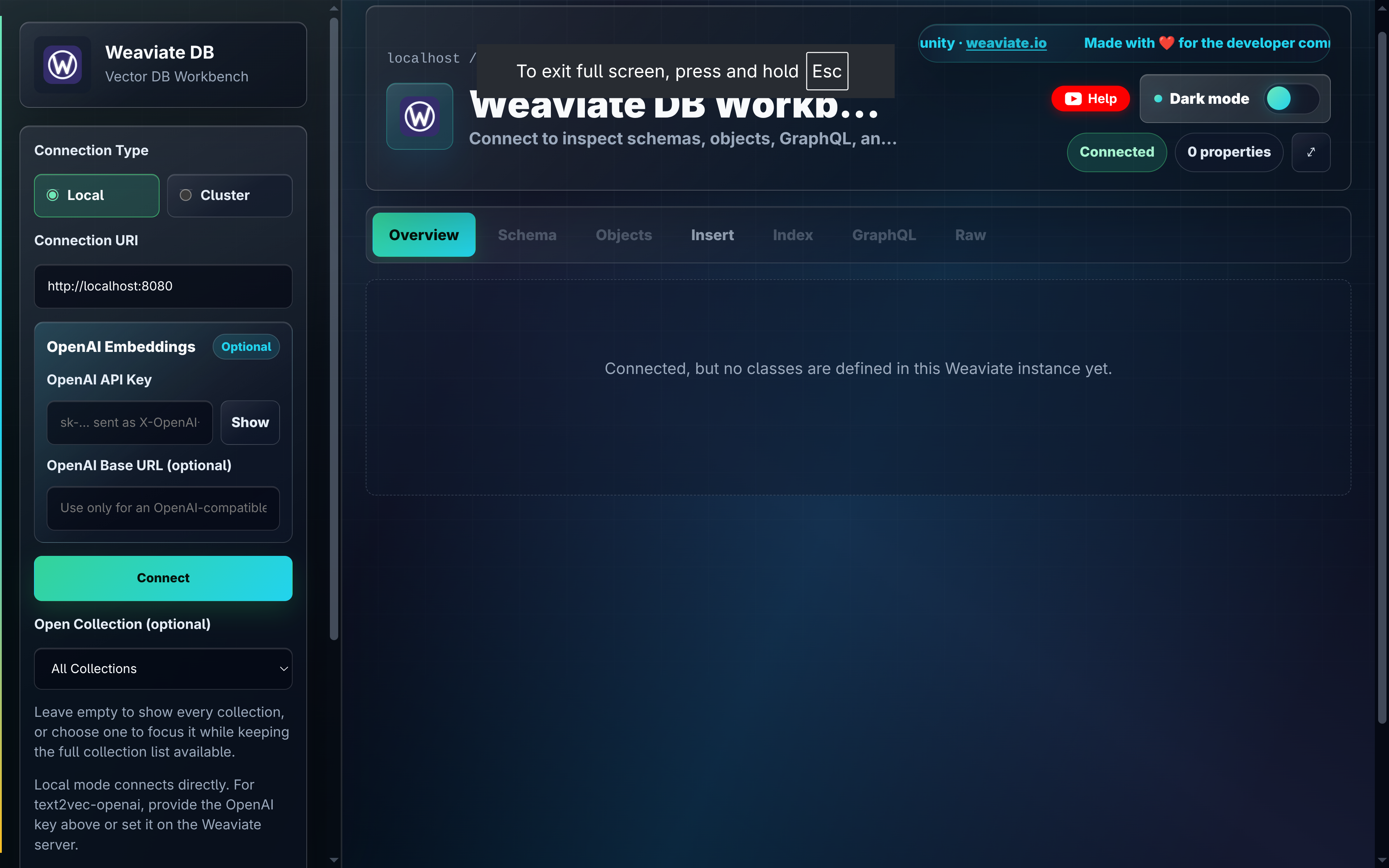
Testing the Database with Weaviate UI
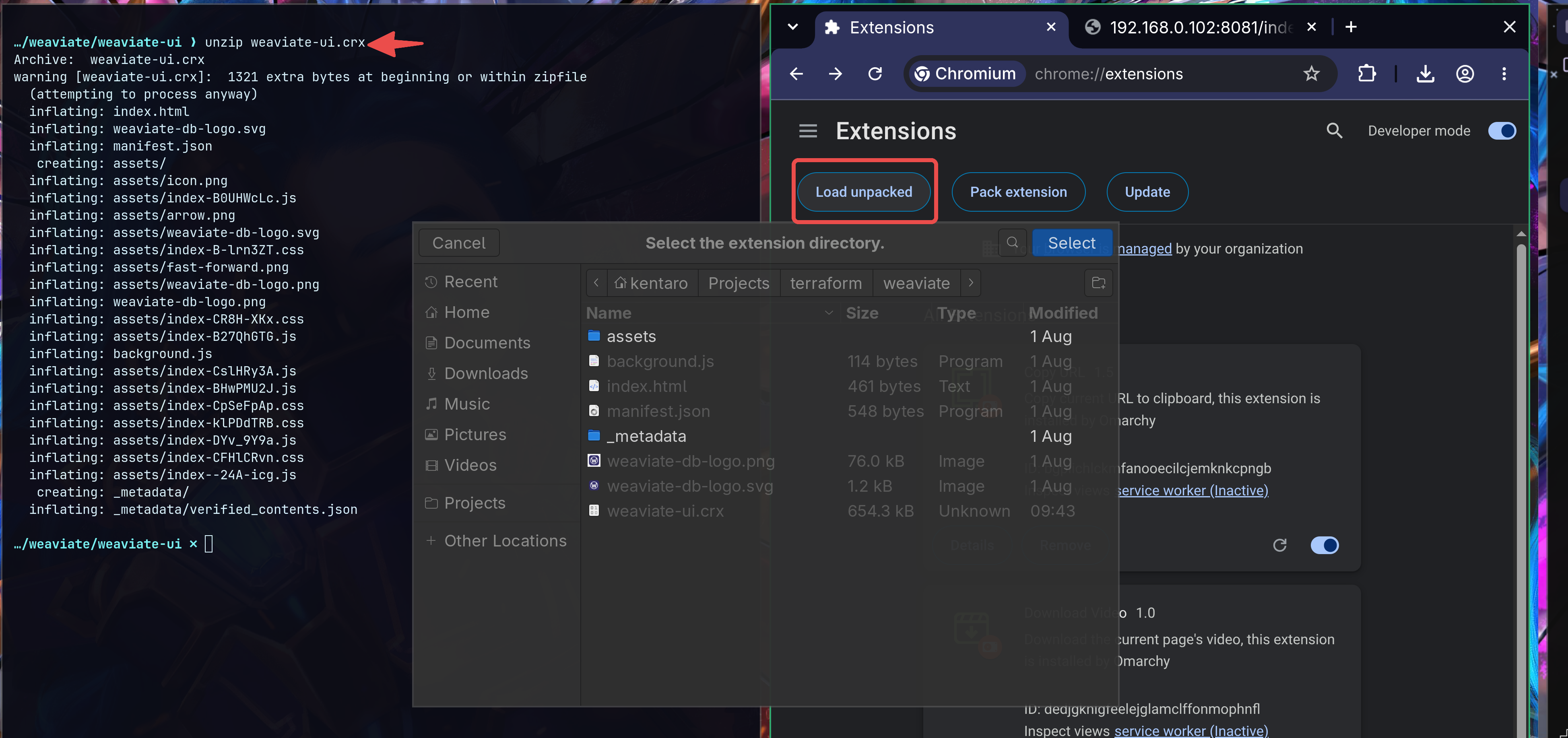
I want to use the weaviate-ui from @harishkaparwan that can be downloaded as an extension from the Chrome store - or downloaded somewhere, unzipped and manually installed in developer mode on a server that cannot connect to the Chrome store:
wget "https://clients2.google.com/service/update2/crx?response=redirect&prodversion=140.0&acceptformat=crx2,crx3&x=id%3Dnaooobcljglmgfefiblbgkdlcomgamhc%26uc" -O weaviate-ui.crx

unzip weaviate-ui.crx
The user interface then be connected via localhost:8080: