
Getting to know the Model Context Protocol
- Getting to know the Model Context Protocol
Example I :: File-Access MCP Server (Python - FastMCP)
A production-ready Model Context Protocol (MCP) server in Python that turns any local
directory of text files into a first-class document store for LLMs and AI agents. Built on
FastMCP 2.x (the standalone fastmcp package, 4.x line) over the
official mcp SDK transports, it speaks JSON-RPC 2.0 on both stdio and streamable
HTTP (/mcp), with browser-ready CORS for the MCP Inspector and direct-connect clients.
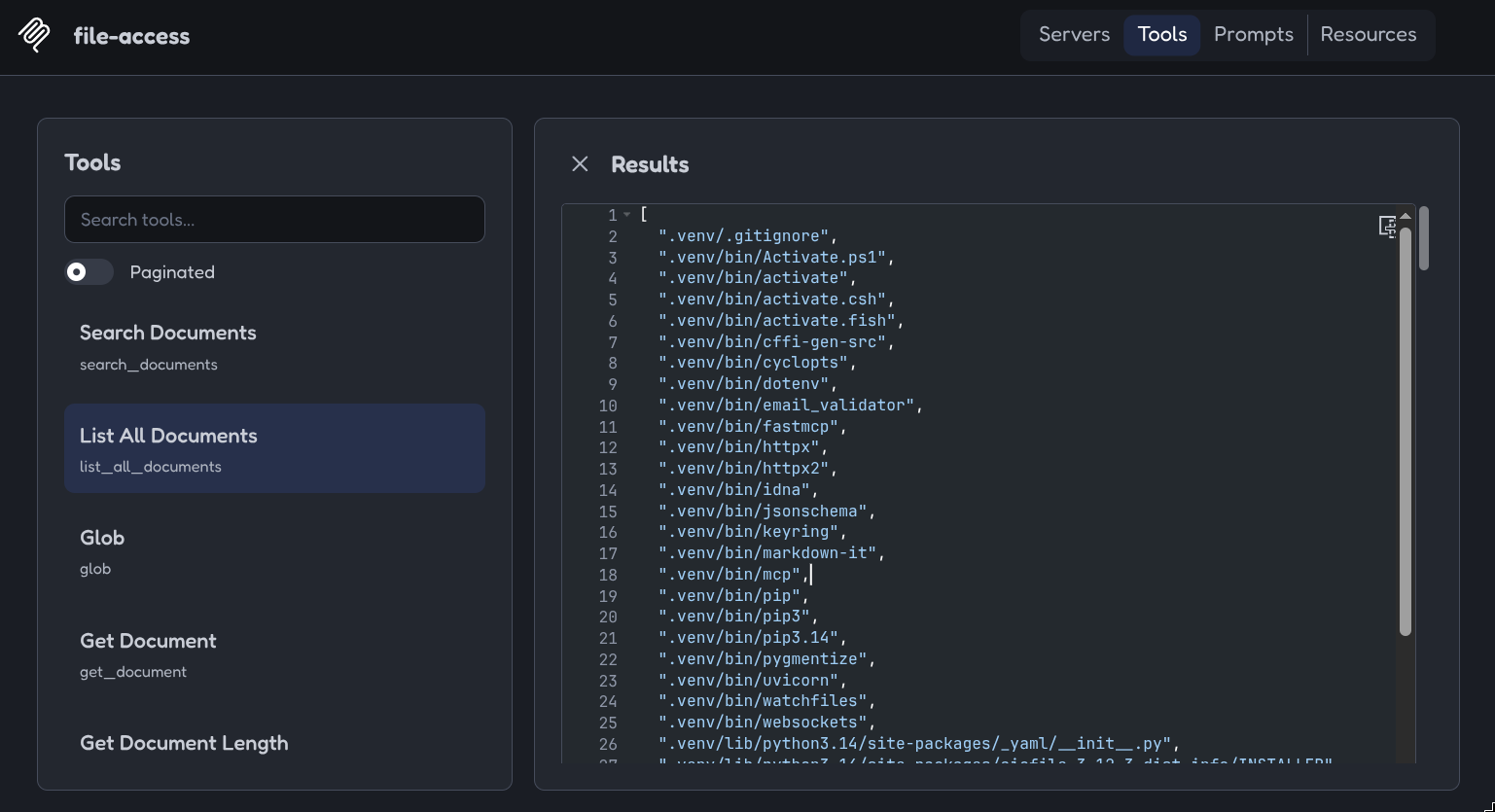
The nine exposed MCP tools cover the full document lifecycle —
search_documents · list_all_documents · glob · get_document · get_document_length ·
get_document_partial · edit_document · create_document · delete_document — with
character-precise offsets, case-insensitive regex-safe substring search, glob patterns
(**/*.txt), structured output alongside plain text, permission flags
(--allow-edit/--allow-create/--allow-delete), symlink escape containment, non-UTF-8
filtering, and atomic crash-safe writes (temp file + rename). The tool descriptions carry an
explicit batch-write policy so agent LLMs always write in small offset-addressed batches
instead of whole files — protecting against output token limit failures.
Keywords: MCP server · Model Context Protocol · FastMCP · LLM · AI agent tooling · document management · file access control · stdio transport · streamable HTTP · SSE-free resumable streaming · JSON-RPC · structured content · CORS · Python 3 · e2e tested.
The three layers
main.py follows a three-layer shape that keeps the MCP details out of your
real logic:
┌─────────────────────────────────────────────────────────────────┐
│ 3. TRANSPORT        main() → mcp.run(transport="stdio")         │
│                        or serve_http() → mcp.http_app() + uvicorn│
├─────────────────────────────────────────────────────────────────┤
│ 2. TOOL LAYER       build_server()  @mcp.tool() wrappers        │
│                        docstrings/annotations → MCP contract     │
│                        DocumentError → ToolError                │
├─────────────────────────────────────────────────────────────────┤
│ 1. DOMAIN           class DocumentStore                         │
│                        pure Python, no MCP imports, testable     │
└─────────────────────────────────────────────────────────────────┘
Layer 1 — the domain: plain Python, zero MCP imports
DocumentStore (the first ~250 lines) is a self-contained class: path
containment (resolve()), lazy UTF-8 document iteration
(iter_documents()), search/list/glob, partial reads, atomic edits
(tempfile.mkstemp + os.replace), and permission gating (_require).
It raises its own DocumentError. Nothing in this layer knows an LLM
exists — this is what makes the logic unit-testable and reusable.
Layer 2 — the tool layer: one decorator turns a function into an MCP tool
The minimal skeleton of the whole mechanism in build_server():
from fastmcp import FastMCP, ToolError

mcp = FastMCP("file-access", instructions="...what this server can do...")

@mcp.tool()                                   # ← this is the entire registration
def get_document_length(rel_path: str) -> int:
    """Return the length of the document at rel_path in characters (not bytes)."""
    return store.length(rel_path)
FastMCP derives everything the agent sees from the Python function:
| FastMCP reads from the function | Becomes in the MCP protocol (what the agent's LLM sees) |
|---|---|
| function name | tool name (get_document_length) |
| docstring | tool description — the LLM's only documentation, so write it for an LLM |
parameter names, str/int/bool/list[...] annotations, defaults | the JSON-Schema inputSchema (e.g. max_results: int = 20 → optional param) |
return annotation (str, list[str], list[dict], int) | the structured-output shape; the agent gets structured_content and a text rendering |
| exceptions | error results: raise ToolError(msg) → the client sees a clean one-line isError message; other exceptions → Error calling tool ... |
Two practical details from this codebase worth copying into your own server:
- The docstring is your product feature. The
edit_document/create_documentdocstrings end with an "ALWAYS WRITE IN BATCHES" policy — that is how you steer agent behavior at the protocol level, e.g. preventing a model from ever emitting a whole file in one call and hitting its output token limit. Anything you want the agent to always do, say in a docstring. - Convert domain errors to
ToolErrorin the thin wrapper (here the_callhelper), so the agent getsediting is not enabled on this server (start file-access with --allow-edit)instead of a Python traceback.
The server instructions (instructions= in the FastMCP(...) call, built
by describe_capabilities()) are advertised at MCP initialize time — use
them for capability state (which write flags are on) and global policy, the
docstrings for per-tool usage.
Layer 3 — the transport: one line per wire protocol
mcp.run(transport="stdio", show_banner=False)      # clients launch this process for you
app = mcp.http_app()                               # …or serve it: ASGI app at /mcp
app.add_middleware(CORSMiddleware, ...)            # browser clients (Inspector) need CORS
uvicorn.run(app, host=host, port=port)
In fastmcp 4.x the host/port belong to the runner (uvicorn /
mcp.run(...)), not to the FastMCP(...) constructor. Note mcp.run is a
blocking call — it is the server's main loop.
Recipe: adding your own tool to a FastMCP server
- Implement the behavior in the domain layer (pure Python, own exception type).
- In
build_server():@mcp.tool()above a wrapper that calls it. - Name the tool verb+noun (
rename_document), annotate all parameters with concrete types (lists of dicts/str/int for structured results) and give sensible defaults. - Write the docstring for an LLM: exact meaning of each arg, units (characters, not bytes!), error conditions, and any behavior you want forced (e.g. the batch-write policy).
- Wrap domain errors in
ToolError, then extend the test suite with the same "advertised → works → refused/error" checks the other tools have intesting.py.
Testing
Prerequisites
- Python 3.10+ (developed and tested on 3.14)
- A directory of UTF-8 text documents you want the agent to work with
# 1. Set up
python3 -m venv .venv && source .venv/bin/activate
pip install -r requirements.txt

# 2. Point the server at your documents (stdio mode — for most MCP clients)
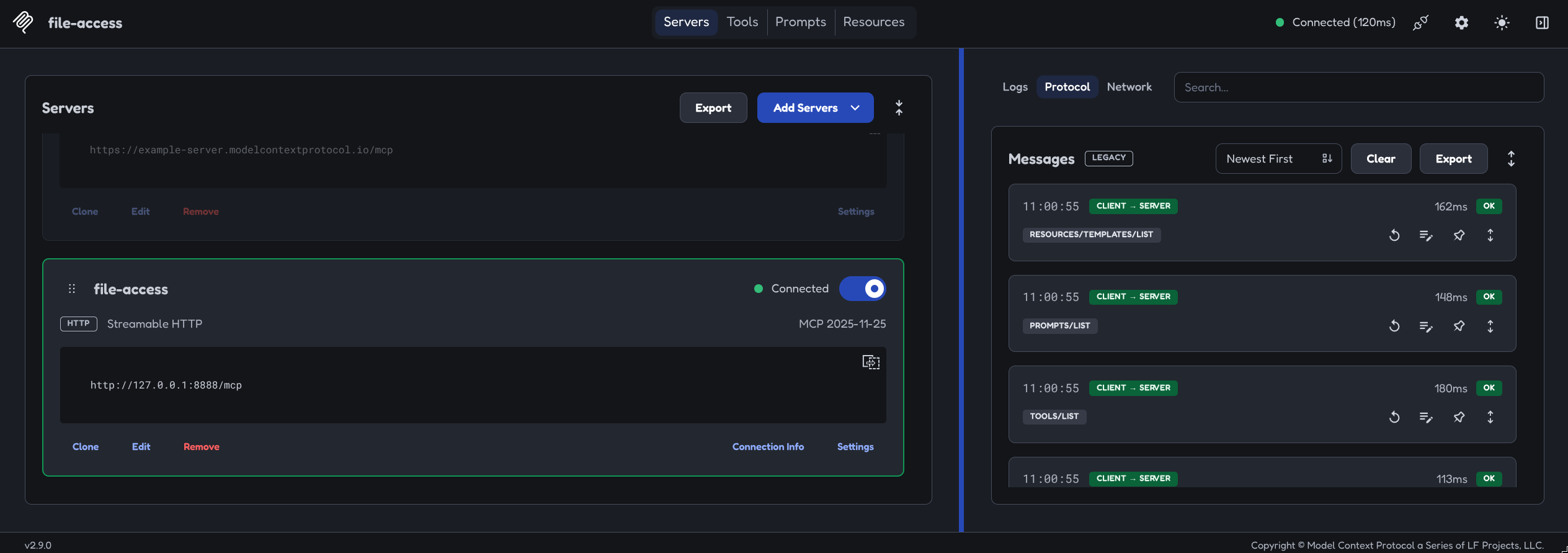
python main.py --host 127.0.0.1 --port 8888 /path/to/your/docs
# 2'. Alternative: streamable HTTP mode (for browser/remote clients, URL http://HOST:PORT/mcp)
python main.py --host 127.0.0.1 --port 8888 /path/to/your/docs
curl -sS -i -X POST http://127.0.0.1:8888/mcp -H 'Content-Type: application/json' -H 'Accept: application/json, text/event-stream' -d '{"jsonrpc":"2.0","id":1,"method":"initialize","params":{"protocolVersion":"2025-06-18","capabilities":{},"clientInfo":{"name":"curl","version":"0"}}}'

HTTP/1.1 200 OK
date: Tue, 06 Oct 2026 11:09:33 GMT
server: uvicorn
cache-control: no-cache, no-transform
connection: keep-alive
content-type: text/event-stream
mcp-session-id: bd311cd0780c4abc9c16979a7458dff6
x-accel-buffering: no
vary: Origin
Transfer-Encoding: chunked

event: message
data: {"jsonrpc":"2.0","id":1,"result":{"protocolVersion":"2025-06-18","capabilities":{"logging":{},"prompts":{"listChanged":true},"resources":{"subscribe":false,"listChanged":true},"tools":{"listChanged":true}},"serverInfo":{"name":"file-access","version":"4.0.11"},"instructions":"Serving documents under /home/kentaro/Projects/mcp-servers/file-access-mcp. Read tools are always available. Write capabilities on this instance: edit_document disabled (start file-access with --allow-edit), create_document disabled (start file-access with --allow-create), delete_document disabled (start file-access with --allow-delete). Calling a write tool this instance does not permit returns an error naming the missing flag."}}
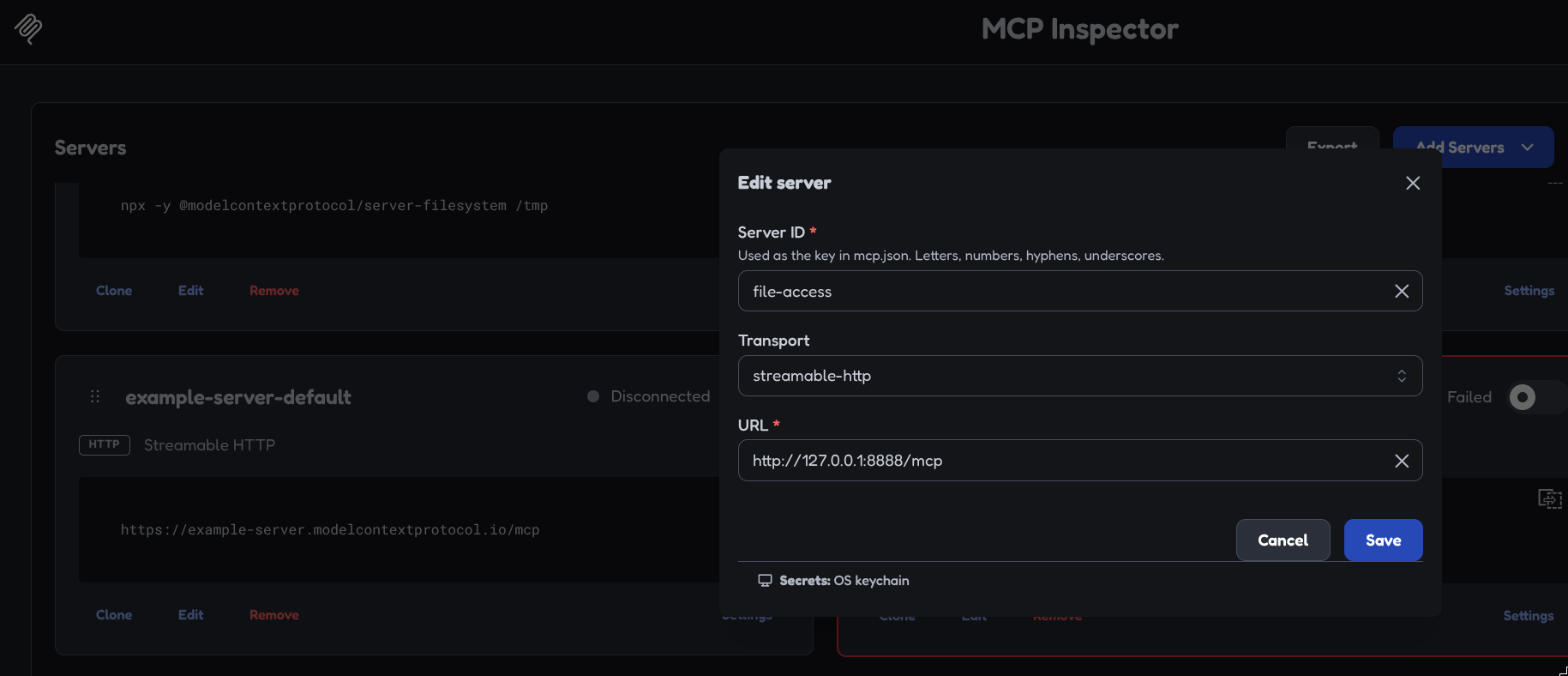
Testing the Server with MCP Inspector
Using the official MCP Inspector - An open protocol that enables seamless integration between LLM applications and external data sources and tools.
git clone https://github.com/modelcontextprotocol/inspector.git
The MCP Inspector provides three ways to inspect a server:
- Web — a Vite + React + Mantine single-page app with a Node backend.
- CLI — a scriptable command-line client for automation, CI, and fast agent feedback loops.
- TUI — an interactive terminal UI built with Ink.
All three run through one global mcp-inspector binary:
npx @modelcontextprotocol/inspector          # web UI (default)
npx @modelcontextprotocol/inspector --cli    # CLI
npx @modelcontextprotocol/inspector --tui    # TUI
Example II :: Weather API (Typescript)
The Model Context Protocol (MCP) is an open standard that connects AI applications to the systems where your data and tools live. You write a server that exposes tools, resources, and prompts; any MCP host — Claude Code, VS Code, Cursor, your own application — connects to it and lets a model use them. The protocol is defined by the MCP specification; this SDK is its TypeScript implementation, on Node.js, Bun, and Deno.
❯ npm init -y
❯ npm pkg set type=module
❯ npm install @modelcontextprotocol/server zod tsx
❯ mkdir src
Creating the Server
❯ nano src/index.ts
registerTool takes a name, a config, and an async handler. inputSchema is a Zod schema — the only schema you write. From that one schema the SDK derives the JSON Schema the model sees, validates arguments before your handler runs, and infers the handler's argument types.
import { McpServer } from '@modelcontextprotocol/server';
import { serveStdio } from '@modelcontextprotocol/server/stdio';
import * as z from 'zod/v4';

const NWS_API = 'https://api.weather.gov';

interface AlertsResponse {
    features: { properties: { event?: string; headline?: string } }[];
}

function createServer(): McpServer {
    const server = new McpServer({ name: 'weather', version: '1.0.0' });

    server.registerTool(
        'get-alerts',
        {
            description: 'Get the active weather alerts for a US state',
            inputSchema: z.object({
                state: z.string().length(2).describe('Two-letter US state code, e.g. CA')
            })
        },
        async ({ state }) => {
            const code = state.toUpperCase();
            const url = `${NWS_API}/alerts/active?area=${code}`;
            const res = await fetch(url, { headers: { 'User-Agent': 'mcp-weather-tutorial/1.0' } });
            if (!res.ok) {
                return { content: [{ type: 'text', text: `NWS API error: HTTP ${res.status}` }], isError: true };
            }
            const { features } = (await res.json()) as AlertsResponse;
            if (features.length === 0) {
                return { content: [{ type: 'text', text: `No active alerts for ${code}.` }] };
            }
            const lines = features.map(f => f.properties.headline ?? f.properties.event ?? 'Unnamed alert');
            return { content: [{ type: 'text', text: lines.join('\n') }] };
        }
    );

    return server;
}


void serveStdio(createServer);
console.error('weather MCP server running on stdio');
The handler returns content, a list of typed blocks — one text block here. isError: true marks a failed result the model can read and react to. serveStdio owns the stdio transport: it reads requests on stdin, writes responses to stdout, and calls createServer to build the instance that serves the connection.
To start the server from the project root run:
❯ npx tsx src/index.ts

npm notice run weather-node-mcp@1.0.0 npx
npm notice run 'tsx' src/index.ts
weather MCP server running on stdio
Nothing else happens: an stdio server waits on stdin for a client to start the conversation. Stop it with Ctrl+C.
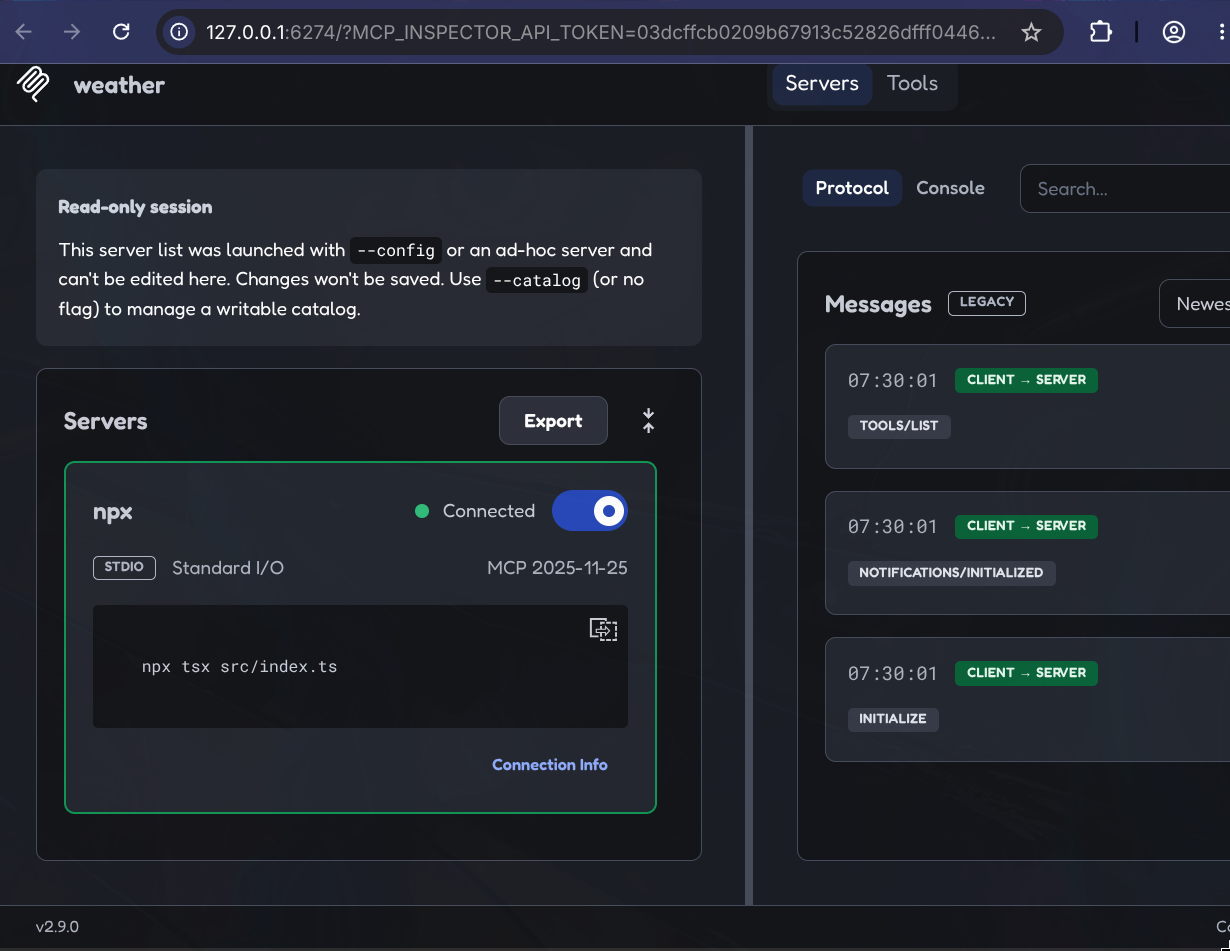
Testing the Server with MCP Inspector
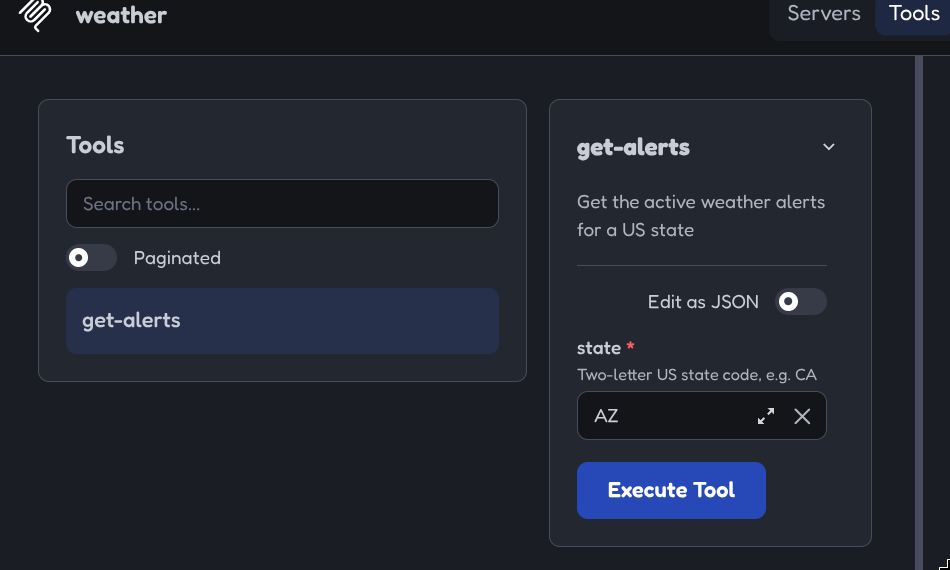
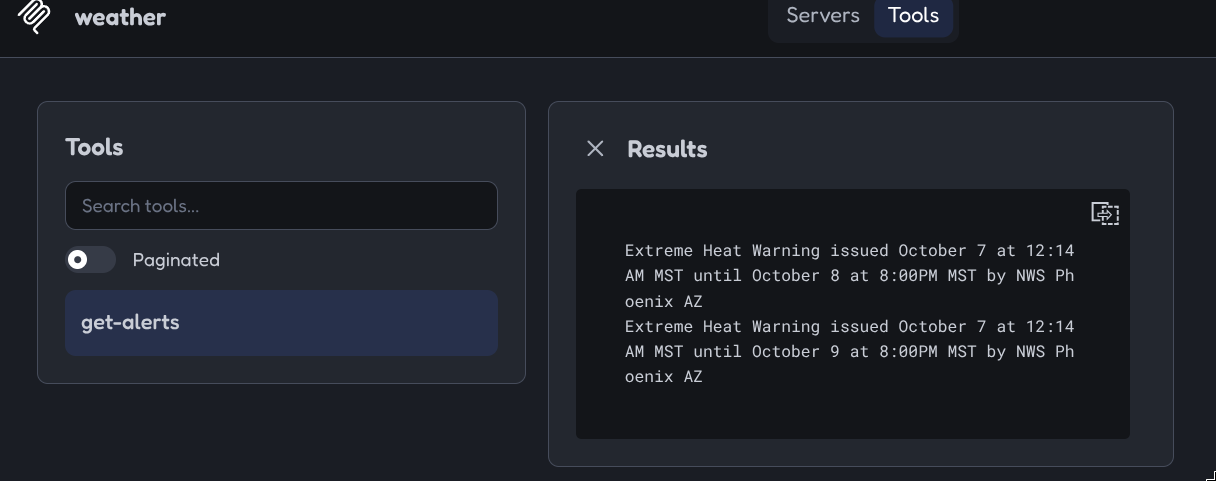
The MCP Inspector is a local web app for calling a server's tools directly — it launches the command you give it and connects over stdio.
❯ npx @modelcontextprotocol/inspector npx tsx src/index.ts

inspector npx tsx src/index.ts
npm notice run weather-node-mcp@1.0.0 npx
npm notice run 'mcp-inspector' npx tsx src/index.ts
Starting MCP inspector...

MCP Inspector Web is up and running at:
   http://127.0.0.1:6274?MCP_INSPECTOR_API_TOKEN=03dcffcb0209b67913c52826dfff0446efe042672ccd669c873c13279511a540

   Sandbox (MCP Apps): http://127.0.0.1:6275/sandbox

   Auth token: 03dcffcb0209b67913c52826dfff0446efe042672ccd669c873c13279511a540

   Secrets: OS keychain

Opening browser...
Connecting a Client
In the weather project, add the client package — it ships separately from @modelcontextprotocol/server.
npm install @modelcontextprotocol/client
nano src/client.ts
A Client plus one transport is a complete MCP client:
import { Client } from '@modelcontextprotocol/client';
import { StdioClientTransport } from '@modelcontextprotocol/client/stdio';

// Let the client start the server
const client = new Client({ name: 'my-client-id', version: '1.0.0' });

const transport = new StdioClientTransport({
    command: 'npx',
    args: ['tsx', 'src/index.ts']
});

await client.connect(transport);


// List all tools
const { tools } = await client.listTools();
for (const tool of tools) {
    console.log(tool.name, '—', tool.description);
}


// Calling a tool
const result = await client.callTool({ name: 'get-alerts', arguments: { state: 'AZ' } });

for (const block of result.content) {
    if (block.type === 'text') console.log(block.text);
}

await client.close();
connect()spawns npx tsxsrc/index.tsas a child process, speaks JSON-RPC over its stdin and stdout, and completes the initialize handshake. The client owns that process from here: it lives exactly as long as the transport.listToolsreturns every tool the server registered, with the JSON Schema it derived for each one's arguments.callTooltakes the tool's name and an arguments object that must satisfy itsinputSchema.
❯ npx tsx src/client.ts

npm notice run weather-node-mcp@1.0.0 npx
npm notice run 'tsx' src/client.ts
npm notice run weather-node-mcp@1.0.0 npx
npm notice run 'tsx' src/index.ts
weather MCP server running on stdio
get-alerts — Get the active weather alerts for a US state
Extreme Heat Warning issued October 7 at 12:14AM MST until October 8 at 8:00PM MST by NWS Phoenix AZ
Extreme Heat Warning issued October 7 at 12:14AM MST until October 9 at 8:00PM MST by NWS Phoenix AZ
Adding a Resource
nano src/index.ts
server.registerResource('about', 'weather://about', { title: 'About this server', mimeType: 'text/plain' }, async uri => ({
    contents: [{ uri: uri.href, text: 'Alert data comes from the US National Weather Service.' }]
}));
nano src/client.ts
const { resources } = await client.listResources();
console.log(resources);

const { contents } = await client.readResource({ uri: 'weather://about' });
console.log(contents);
❯ npx tsx src/client.ts
npm notice run weather-node-mcp@1.0.0 npx
npm notice run 'tsx' src/client.ts
npm notice run weather-node-mcp@1.0.0 npx
npm notice run 'tsx' src/index.ts
weather MCP server running on stdio
[
  {
    name: 'about',
    title: 'About this server',
    uri: 'weather://about',
    mimeType: 'text/plain'
  }
]
[
  {
    uri: 'weather://about',
    text: 'Alert data comes from the US National Weather Service.'
  }
]
get-alerts — Get the active weather alerts for a US state
Extreme Heat Warning issued October 7 at 12:14AM MST until October 8 at 8:00PM MST by NWS Phoenix AZ
Extreme Heat Warning issued October 7 at 12:14AM MST until October 9 at 8:00PM MST by NWS Phoenix AZ