- 1. YOLO Inference — Tauri + Rust + React Desktop App
1. YOLO Inference — Tauri + Rust + React Desktop App
A cross-platform desktop application that analyzes video and image files for "motion events": it scans a video, locates the moment of significant motion, extracts the most important frame, then runs it through two ONNX YOLO models in parallel — an object-detection model (bounding boxes) and an instance-segmentation model (masks) — and renders both results as annotated preview images. Plain image files skip the video stage and go straight into inference.
Built with Tauri 2 as the application shell:
a lightweight Rust core (src-tauri) does all the heavy lifting, and a React 19 / TypeScript / Vite frontend (src) talks to it over Tauri's typed command/event IPC.
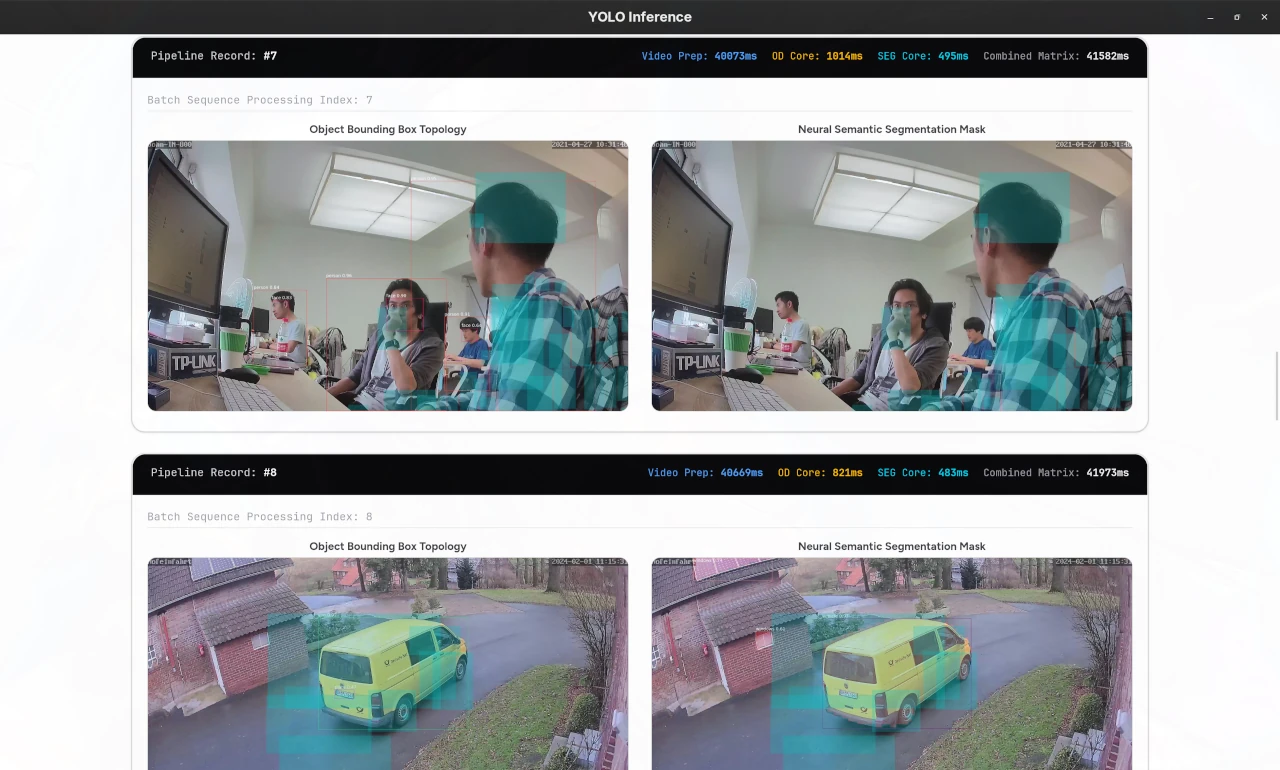
The UI let's you select both a e.g. YOLOv10 or YOLO26 object detection and segmentation model and batch runs all you input videos through them in paralell. The
teal coloured boxesare areas where motion was detected. The rest are bounding boxes and segmentation masks for detected objects.
1.1. I. Introduction
instar-object-detector is a single-purpose, end-to-end computer vision pipeline packaged as a native desktop app — no web server, no GPU, no Python runtime at run time. What makes it interesting:
- 100% local, CPU-only ONNX inference. Models run through
tract-onnx(a pure-Rust ONNX runtime). You download an Ultralytics YOLO export as.onnxand that's the only runtime dependency for inference. - Statically linked FFmpeg. Video decoding uses
video-rswithffmpeg-nextbuilt from source and statically linked, so the release binary is self-contained — no system FFmpeg, no dynamic libraries. - Motion-event extraction. Videos are scanned with classic image processing: grayscale conversion, Gaussian blurring, background subtraction, thresholding, morphological dilation and contour detection (
imageproc) to find where the action happened and pick the frame worth analyzing. - Two ONNX tensor conventions handled automatically. The parser understands both raw / pre-NMS Ultralytics exports (feature-major, requires in-app NMS) and end-to-end NMS-baked-in exports — and both pixel-space and normalized-coordinate variants — so YOLOv10 and YOLO26 exports (and the fine-tuned "instar" variants) all work out of the box.
- Object detection and instance segmentation in one pass. Bounding boxes come from an OD model; per-instance masks are reconstructed from 32 prototype mask coefficients + learned mask heads, drawn straight onto the frame together with motion-region overlays.
- Parallel by design. Files are processed concurrently with
rayon, and OD + SEG inference for each frame runs on separate threads viarayon::join— the two model calls are fully independent. - Event-driven UI. The Rust core streams progress logs and finished result images to the React UI over Tauri events (
log_event,image_event), and previews are loaded through Tauri'sasset:protocol — no network stack involved.
Tech stack at a glance: Tauri 2 · Rust (Rayon, NDArray, Tract-ONNX, FFmpeg-next) · React 19 · TypeScript · Vite 8 · Tailwind CSS 4 · shadcn/ui · Radix UI · video-rs · image / imageproc.
1.2. II. How to Use the Application
1.2.1. Prerequisites
-
Node.js ≥ 20 and npm (install:
nvm install 22) -
Rust — stable toolchain via rustup (the provided
build.shcan also install a private local toolchain for you ifcargoisn't on your PATH) -
nasm — only needed the first time FFmpeg is compiled from source (
build.shfetches a private copy automatically if it is missing):sudo dnf install nasm/sudo apt install nasm/brew install nasm
1.2.2. Clone and install the JavaScript dependencies
git clone <this-repo> instar-object-detector
cd instar-object-detector
npm install
1.2.3. Build the Tauri app binary
Easiest — run the one-shot build script:
./build.sh
It executes, in order: npm install → npm run build (TypeScript + Vite → dist/) → ensures Rust and nasm are available → cargo build --release --features tauri/custom-protocol inside src-tauri (the custom-protocol feature matters: without it the release binary tries to load the dev server instead of the bundled frontend) → copies the binary to deployment/tauri_yolo_release → syncs all *.onnx files from src-tauri/models/ into deployment/models/.
Manual equivalent:
npm run build
cd src-tauri
cargo build --release --features tauri/custom-protocol
cd ../deployment
# copy the binary in:
install ../src-tauri/target/release/tauri_yolo_release .
First build is slow: FFmpeg is compiled from source and statically linked. Rebuilds are incrementally fast.
1.2.4. Get the YOLO26 models
The app needs two ONNX files at run time — an object-detection model and a segmentation model. The COCO-trained YOLO26 nano models are the defaults:
- Export them from Ultralytics (or just download the pre-converted
.onnxweights foryolo26n/yolo26n-segfrom your ultralytics install / training machine):
pip install ultralytics
yolo export model=yolo26n.pt      format=onnx
yolo export model=yolo26n-seg.pt  format=onnx
- Place the resulting
.onnxfiles into one of the model directories:
| Location | Used when |
|---|---|
src-tauri/models/ | Development — build.sh syncs these into deploy |
deployment/models/ | Run time — the app reads them from here |
Defaults used by the UI: models/yolo26n.onnx (OD) and models/yolo26n-seg.onnx (SEG), relative to where the binary is executed (i.e. deployment/), so putting them in deployment/models/ is what matters.
The fine-tuned "instar" models (YOLO26n-seg-motion…, YOLO26n-seg-static…, YOLO26s-static…, yolov10s-instar-motion…) ship with the repository — drop any additional custom .onnx next to them and pick it in the UI.
1.2.5. Place your input video(s) or image(s)
Supported inputs are anything in .avi .mp4 .mkv .mov (video) plus common image formats. Put files into the target directory — the default is:
deployment/input_images/
(e.g. cp my_clip.mp4 my_photo.jpg deployment/input_images/)
Any folder works: the "Choose Images Target" button in the UI lets you point at a different directory — every video/image in it is processed.
1.2.6. Run the application
cd deployment
./tauri_yolo_release
1.2.7. Drive the UI
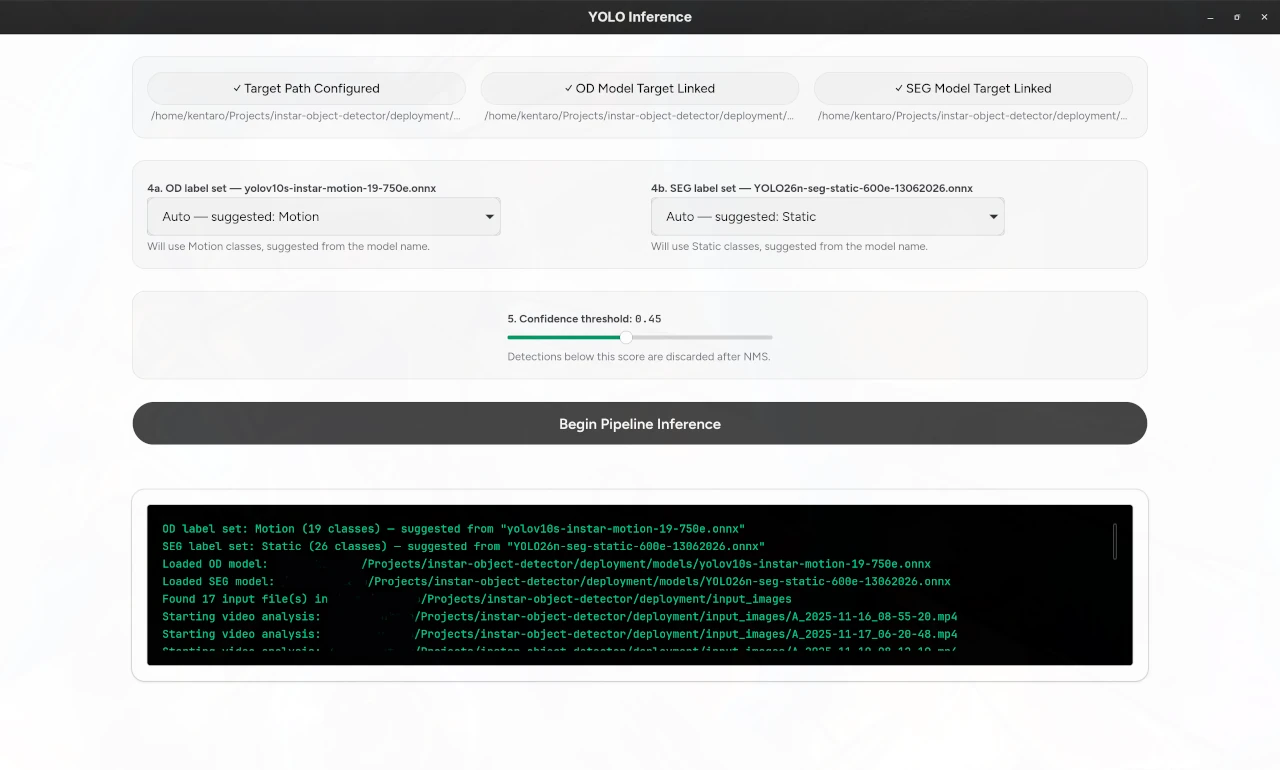
- Choose Images Target — folder containing the videos/images (step 4).
- Select OD Model (.onnx) — object-detection model.
- Select SEG Model (.onnx) — segmentation model.
- Label sets — per model: each of OD and SEG has its own selector (
auto— guessed from that model's filename, or explicitlyCOCO,Motion(19 classes),Static(26 classes), or a custom label file:one class per line,names: ['a','b'], or YAML0: name). This lets you compare models from different datasets side by side. - Confidence threshold — default
0.45; lower to keep more detections. - Click Run Inference — the log panel streams progress (model loading → motion found → per-model top detections → timings), and below it a result gallery fills up with, per input file:
- the OD preview — frame + motion regions (teal overlay) + bounding boxes with class & confidence,
- the SEG preview — frame + motion regions + segmentation masks,
- the measured OD / SEG / video-prep timings.
Finished images are written to deployment/predictions/
(od_<uuid>.jpg / seg_<uuid>.jpg).
1.3. III. Technical Specifications
1.3.1. Architecture Overview
The app follows a strict UI / native-core split. All image and model work happens in Rust; the React layer only holds UI state and renders events.
┌────────────────────────────────────────────────────────────┐
│ React 19 + TS  (src/App.tsx, shadcn/ui, Tailwind 4)        │
│  · path / model / label / threshold state                  │
│  · invoke("run_inference")  ⇄  listen("log_event"/         │
│    "image_event")                                            │
│  · previews via convertFileSrc() → asset: protocol         │
└──────────────────────────┬─────────────────────────────────┘
                           │ Tauri 2 IPC (commands + events)
┌──────────────────────────┴─────────────────────────────────┐
│ Rust core (src-tauri/src/modules/) — spawned via          │
│ tokio::spawn_blocking off the main thread:                │
│  inference.rs   model loading, tensor parsing, NMS, cmd   │
│  video_utils.rs video decode + motion-event extraction    │
│  image_utils.rs  letterbox preprocessing                 │
│  drawing.rs     box / mask / motion-region rendering      │
│  constants.rs   COCO-80 / Motion-19 / Static-26 labels    │
└────────────────────────────────────────────────────────────┘
Cross-cutting choices: rayon thread pools for parallel file processing and for running the two models simultaneously; tract's NDArray for tensor math; serde_json payloads for events; a CSP in tauri.conf.json that allows asset: for local previews without any server.
1.3.2. File Triage
run_inference walks the target directory recursively (walkdir, par_iter — files are processed concurrently), and splits the work by extension:
- Video (
.avi .mp4 .mkv .mov) → motion-event extraction (§3.3) - Image (everything else) → decode via the
imagecrate and preprocess.
1.3.3. Motion-Event Extraction (video path)
find_motion_pixel(path, start_frame=3, tries=-1, interval=5, threshold=10) implements a compact, classic image-processing pipeline in video_utils.rs:
- Frames are decoded in order (up to 500 attempts when
tries = -1) byvideo_rs, which is built against a statically compiled FFmpeg (ffmpeg-nextwith thestatic+buildfeatures) — the binary has zero system dependencies. - Each candidate frame is (a) converted to RGB for the inference stage and (b) converted to grayscale (BT.709 luma weights).
- The grayscale frame is Gaussian-blurred (
imageproc::gaussian_blur) to reject sensor/lighting noise; the first frame is kept as the static background model. - Background subtraction:
|background − frame| > threshold→ binary mask, then morphological dilation (dilate(LInf, 2)) bridges fragments. imageproc::contours::find_contoursextracts object borders; each contour is reduced to a bounding box with a minimum-size filter (> 10 × 10 px).- The first frame producing ≥ 1 motion box is returned together with its boxes — that's the "motion event". If no frame qualifies, the video is skipped with a log message.
1.3.4. Preprocessing (shared by image + video)
letterbox() rescales the frame while preserving aspect ratio, centers it inside a 640×640 canvas and records (scale, pad_x, pad_y). The frame is then repacked as an RGB→CHW f32 NDArray tensor of shape [1, 3, 640, 640], normalized to [0, 1] (÷255) — the exact input contract of the Ultralytics ONNX exports. Every later un-mapping of a coordinate uses the stored (scale, pad_x, pad_y) triple.
1.3.5. Inference Engine
Models are loaded once per run, then executed per file on the
tokio-blocking thread pool:
tract_onnx::onnx().model_for_path(path)?
            .into_optimized()?   // graph-level IR optimizations
            .into_runnable()
tract-onnx is a pure-Rust ONNX runtime (no C++/CUDA runtime): models run on CPU, which is what makes the app portable across machines without a Python/GPU stack.
Output parsing — the interesting part. parse_od_output /
parse_seg_output normalize three different ONNX tensor conventions into the app's internal Detection { x1, y1, x2, y2, score, class_id, mask_coefficients }:
- Raw / pre-NMS (e.g.
yolo26n.onnx→[1, 84, 8400], seg →[1, 116, 8400]+[1, 32, 160, 160]): feature-major with 8400 anchors — rows0..4arecenter-x, center-y, w, h, nextncrows class confidences, (seg:) final 32 rows mask coefficients. The parser picks the argmax class per anchor, thresholds it, convertscxcywh → xyxy, and runs an in-app greedy NMS (IoU0.45, capped at 300 boxes). - End-to-end / NMS-baked-in (e.g.
[1, 300, 6]; fine-tuned instar models): one row per detection[x1, y1, x2, y2, score, class_id]— no NMS needed. - Coordinate spaces inside e2e outputs differ between model families: NMS-free YOLOv10 exports emit xyxy normalized to
[0, 1]over the original image, while the fine-tuned YOLO26 e2e exports emit absolute pixels in a plain-resized 640×640 input square (the fine-tune pipeline resizes the frame non-aspect-preserving, so the axes must be scaled back independently:x·orig_w/640,y·orig_h/640). The parser auto-detects which by the tensor magnitude:max_coord > 1.5⇒ pixel space (per-axis rescale by the original dimensions); otherwise ⇒ normalized (multiply the coordinate byorig_w/orig_h). A single model run therefore works on any mix of the supported exports without configuration.
Layout discrimination between (1) and (2) is structural: raw exports have few feature rows than anchor columns, e2e outputs have N detection rows and 6/38 columns.
1.3.6. Segmentation Masks
An e2e or raw seg model returns, besides boxes, per-detection 32 mask coefficients plus a shared set of [32, 160, 160] prototype masks. draw_detection_with_mask reconstructs each instance mask as:
mask(x, y) = sigmoid( Σᵢ coeffᵢ · protoᵢ(x, y) )
over the 160×160 proto grid, then samples the grid in the model's input space for every pixel inside the box region (image → letterbox → ÷4 → proto coord) and shades the pixel where mask > 0.5.
1.3.7. Rendering
drawing.rs renders straight onto the image crate's RgbImage canvas (the model's own output, not a GPU): bounding-box strokes + class/score labels in a font embedded in the binary (include_font! via rusttype), mask fill as a 40% white "lighten" blend, and the video motion regions as a
25%-alpha teal overlay. Each input file produces one OD and one SEG JPEG, written into ./predictions/ and streamed to the React UI as image_event events.
1.3.8. Concurrency & Performance
- Files are processed in parallel across CPU cores (
entries.par_iter().for_each). - Per file, OD and SEG inference run concurrently on dedicated rayon threads (
rayon::join— the two model runs are independent and neither blocks the other). - The whole batch is spawned with
tokio::task::spawn_blockingso Rust's blocking image/decode work never starves Tauri's async main thread (the UI keeps responding and streaming logs the whole time). - The dev profile is also aggressively optimized (
[profile.dev.package."*"] opt-level = 3inCargo.toml) socargo runbehaves like release without waiting for the full build, and all inference dependencies (tract, NDArray) are compiled at-O3regardless. - FFmpeg is statically linked, which keeps the release binary portable and free of dynamic-linker headaches on CI-less machines.
1.3.9. Repository Layout (condensed)
├── build.sh                     # one-shot build + deployment script
├── deployment/                  # produced / run location after ./build.sh
│   ├── tauri_yolo_release       # the desktop binary
│   ├── models/                  # .onnx files used at runtime
│   │   ├── yolo26n.onnx             # OD (COCO-80)
│   │   ├── yolo26n-seg.onnx         # SEG (COCO-80)
│   │   ├── YOLO26n-seg-motion-…onnx # fine-tuned motion (19 classes)
│   │   ├── YOLO26n-seg-static-…onnx # fine-tuned static (26 classes)
│   │   ├── YOLO26s-static-…onnx     # fine-tuned static (OD variant)
│   │   └── yolov10s-instar-motion-…onnx
│   ├── input_images/            # where you drop your videos/images
│   └── predictions/             # output: od_<uuid>.jpg, seg_<uuid>.jpg
├── src/                         # React frontend
│   ├── App.tsx                  # all UI state + Tauri IPC wiring
│   ├── components/              # shadcn/ui primitives
│   └── main.tsx                 # entry point
└── src-tauri/                   # Rust native core
    ├── models/                  # .onnx source for development builds
    ├── Cargo.toml
    └── src/
        ├── main.rs              # Tauri app entry, video-rs init, plugin registration
        ├── lib.rs               # re-exports modules + tauri command registration
        └── modules/
            ├── inference.rs     # model load, parse, NMS, commands
            ├── video_utils.rs   # video decode + motion-extraction pipeline
            ├── image_utils.rs   # letterbox + RGB→CHW tensorization
            ├── drawing.rs       # box/mask/motion rendering onto canvas
            ├── constants.rs     # COCO/Motion/Static label tables + palettes
            └── models.rs        # Detection, BBox, PreprocessedImage, …